Below is a quick idapython snippet to find specific mnemonics you may want to look for. either replace " if (mnem == 'fldcw'):" with what you're looking for, or add more to the logic to search for multiple mnemonics.
Disclaimer: a friend and I coded this VERY quickly and there may be errors, its definitely not "production" quality, probably best to use as a reference or something to build upon ;)
===========================================================
mnemonics = dict()
for seg_ea in Segments():
for head in Heads(seg_ea, SegEnd(seg_ea)):
if isCode(GetFlags(head)):
mnem = GetMnem(head)
if (mnem == 'fldcw'):
print 'fldcw at: 0x%x' % head
mnemonics[mnem] = mnemonics.get(mnem,0)+1
Showing posts with label malware. Show all posts
Showing posts with label malware. Show all posts
Thursday, March 3, 2011

Friday, February 4, 2011
Obfuscation Techniques
Making a quick post on some obfuscation techniques I've seen. This will also be a multi part post, but I won't number them because who knows when it would end :P
first, the malware I got this from imports only a couple of seemingly harmless api, one of them being GetCommandLine. So we dereference it's address into eax and call a routine to get the base address for kernel32.dll like so:
- mov eax, ds:GetCommandLineA ; cpy the addr of GetCmdLine into eax
- push eax ; push addr of GetCommandLine
- call GetStartAddrFor_Kernel32 ; emulate GetProcAddress
So now we have address of GetCommandLine in kernel32.dll so we take that address and zero out the last 3 nibbles by doing an and with 0xFFFFF000h
GetStartAddrFor_Kernel32;
- mov ebp, esp
- sub esp, 8
- mov eax, [ebp+addrGetCmdLine] ; cpy GetCommandLine's address to eax
- xor ecx, ecx
- ; zero the last 3 nibbles of the address, its now 0xXXXXX000
- and eax, 0FFFFF000h
- and ecx, 0Fh
- mov [ebp+addrGetCmdLine], eax ; replace with the new address
Then we enter a loop, which takes the address, dereferences a word from the address into edx, and compares it with 0x5A4Dh, which is 'MZ'
- loc_401106: ; CODE XREF: GetStartAddrFor_Kernel32+5Aj
- mov edx, 1
- test edx, edx
- jz short loc_40114C
- mov eax, [ebp+addrGetCmdLine]
- mov [ebp+var_8], eax ; cpy the address to a tmp variable
- mov ecx, [ebp+var_8]
- movzx edx, word ptr [ecx] ; dereference a word from that address into edx
- cmp edx, 5A4Dh ; does edx == 'MZ'?
- jnz short loc_40113F
If we found 'MZ', next check for 'PE' by adding 0x3c to the address, which should point to the PE header structure
- mov eax, [ebp+var_8] ; if 'MZ' then set EAX
- mov ecx, [ebp+var_8] ; and ECX to be the start address for kernel32
- add ecx, [eax+3Ch] ; add 3ch to ecx, it now points to the PE header struct
- mov [ebp+var_4], ecx ; cpy PE struct addr to a variable
- mov edx, [ebp+var_4] ; and to edx as well
- ; make sure we're at the right place, 45h 50h == 'PE'
- cmp dword ptr [edx], 4550h
- jnz short loc_40113F ; if we're at the right spot
- mov eax, [ebp+var_8] ; cpy start addr of kernel32 into eax again
- jmp short loc_40114C ; and exit
If we didn't find 'MZ' then subtract 0x1000h from the address and loop until we find it.
- loc_40113F: ; CODE XREF: GetStartAddrFor_Kernel32+31j
- mov eax, [ebp+addrGetCmdLine]
- sub eax, 1000h ; subtract 4KB from eax
- mov [ebp+addrGetCmdLine], eax
- jmp short loc_401106
Once found, return
- loc_40114C: ; CODE XREF: GetStartAddrFor_Kernel32+1Dj
- mov esp, ebp
- pop ebp
- retn
Then when we return, do some checking for the OS, on a WinXP box GetCommandLine's address points to a mov, while a Win7 box points to a jump
- add esp, 4 ; stack adjust
- mov kernel32addr, eax ; cpy addr of Kernel32 to a variable
- mov ecx, ds:GetCommandLineA ; cpy GetCmdLine's addr to ecx
- movzx edx, byte ptr [ecx] ; deref a byte to edx
- cmp edx, 0A1h ; if its a mov [WinXP], jump
- jz short loc_40126A ; cpy kernel32 addr to edx
- mov eax, ds:GetCommandLineA
- movzx ecx, byte ptr [eax] ; deref a byte of what's there to ecx
- cmp ecx, 0EBh ; if its a jmp [win7] then jump
- jz short loc_40126A ; cpy kernel32 addr to edx
So, a quick wrap-up of what the above really did:
We got the address to an exported API from kernel32.dll, then we using that address we resolved the base address of kernel32. Once we have that, we check to see what OS we're running on. In a later post I'll show how this piece walks through the PE file to find the exports directory, and starts resolving address for other API by walking through it.
darel
Monday, January 24, 2011
PDF analysis part 1
Wanted to do a quick post on PDF analysis. This will be a 2 part post, I don’t have time to finish it this week because Shmoocon is this weekend and I need to do other things :) The sample I'm using can be found here.
Probably the easiest and fastest thing to do is to run the PDF in a VM with acrobat reader and whatever tools you use to monitor system changes and just snag whatever dropped files you get to analyze. If that doesn’t work, and you have a throwaway system lying around that you can re-image later, you could just open the PDF in acrobat on a real physical machine and collect your files.
But if that fails, you don’t have the vulnerable version of acrobat reader installed, or whatever, you just don’t seem to get any dropped files, we can still try and get something to analyze. The first thing I do with a PDF typically is open it in 010 editor, and using Didier Stevens file format template found here, take a look at it and see what info we can get. A few things I immediately look for are, multiple "%EOF", or "/Javascript" tags, or "/EmbeddedFile", and I usually start by looking at the objects that are the largest in size. Kinda like this:

Also, if we select that last struct thats defined in 010 as a PDFXref, up top you will see one "%EOF" and if you scroll to the very bottom (about 164700 bytes on down) then we will see another "%EOF". Looks fishy eh :) Probably embedded file(s). At this point, your fastest route would probably be to to look shortly after the first "%EOF" for an 'M' and see if the next byte could be XOR'd with something to get a 'Z', then track down the PE section and try to dig the binary out manually. If you can do that, you can save yourself the following steps. I took a glance, and I noticed all incrementing and decrementing bytes:
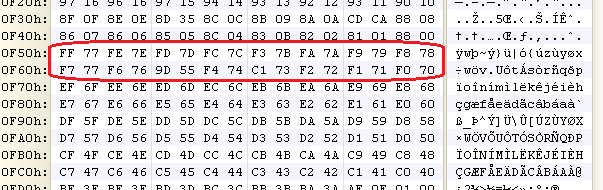
Those are probably NULLs, so it looked like an incrementing / decrementing 2 byte key, but I fiddled with it for an hour or so and my un-XOR'd version certainly wasnt a valid PE file so I decided to analyze the shellcode instead. I haven't analyzed the shellcode yet, so it probably is still some simple XOR encryption.
So lets use yet another useful tool by Didier Stevens, pdf-parser, and it can be found here. If we run "pdf-parser.py --stats xxxxxxxx.pdf" on the file, it looks like object 1 has an embedded file:
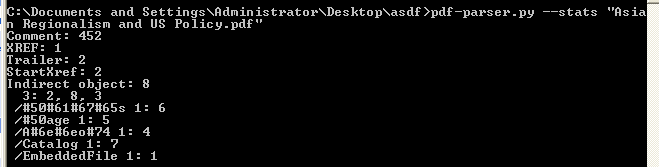
So lets get a little more info on that object by running "pdf-parser.py --object 1 --raw xxxxxxxx.pdf" and we see this is object contains a stream of compressed data:

Getting warmer :) So lets inspect this fishy ass object by using the --filter flag and send the output to an xml file like so:

and if we open this up with notepad++ we see the following:

Looks like base64 encoded shellcode to me :) lets decode it in either notepad++ or copy it over to 010, they both can do it for us. I prefer 010, so copy everything between quotes after that "sBase=" tag, so starting at "SUkq..." down to "...AAC=" and paste it into a new file in 010. You should be here:

After you have it in the new file, highlight everything and run the DecodeBase64 script on it, and then switch to the hex view and we should see this:

Scrolling through, it looks like a NOP sled followed by some shellcode doesnt it? now you can save this new binary file and in IDA you can open it and take a look, or use a tool that will convert the hex to a binary we could debug. Thats what we'll do next post.
If you're pressed for tools Python also can do the base64 decode with something like:
import base64, sys; base64.decode(open("input.txt", "rb"), open("output.hex", "wb"))
where you saved "SUkq..." down to "...AAC=" in a text file in your current directory and named it "input.txt".
Thanks to Didier for his blog thats chock full of useful information, check it out if you haven't already.
bye
Subscribe to:
Posts (Atom)